
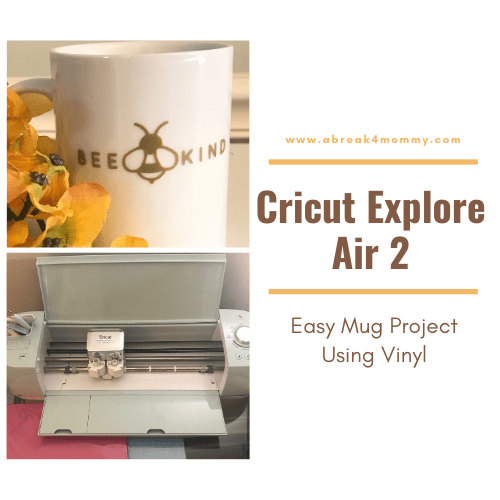
Cricut Explore Air 2 Easy Mug Project Using Vinyl

<p>Sometimes we are blessed with gifts right on time. That is exactly how I feel about my new <a href="https://tap.fit/Sy3Gt3ntB">Cricut Explore Air 2</a>. This year has been trying to say the least for me. So when I became the owner of this lovely crafting machine my heart began to dance. </p>


<p>This is a sponsored conversation written by me on behalf of Cricut. The opinions and text are all mine.</p><!-- TapInfluence Comment Widget - Do Not Edit or Remove --><div id="ti-pixel-tracker"></div><script type="text/javascript" src="https://influencers.tapinfluence.com/assets/cogs/core-v4.js"></script> <script>var ts=document.getElementById('ti-pixel-tracker'); var axel = Math.random() + ""; var num = axel * 1000000000000000000; var ti=document.createElement("img"); ti.style.display="none"; ti.src="https://tracking.tapinfluence.com/trk/iGC5k/Kuq9G/p.png?p=K8hF6" + String.fromCharCode(38) + "i=ePFls" + String.fromCharCode(38) + "ord="+ num + String.fromCharCode(38) + "s=" + encodeURIComponent(document.referrer); ts.parentNode.replaceChild(ti,ts); JSON.stringify({"program_id":"a5516c1a-de27-11e9-9665-0604a9fe185a","post_id":"9e3896b8-df00-11e9-b28f-0604a9fe185a"});</script><!-- End Widget -->


<h2 class="wp-block-heading">Cricut Explore Air 2 My First Impression</h2>


<p>When my <a href="https://tap.fit/Sy3Gt3ntB">Cricut Explore Air 2</a> arrived I was so excited. I have always been into crafting and expressing my artistic self. I have been in love with this machine when I first set eyes on it. If you don&#8217;t know about the Cricut Explore Air 2 let me explain how it works. It cuts a hundred different craft materials like cardstock, vinyl, and iron-on. You can do so much with this crafting beauty, the DIY projects are endless. </p>


<p>I must admit my first project was a little difficult for me to do with customizing my own work so I am so happy that that Cricut gives you access to ready to make projects. With your Cricut machine comes everything you need to get set up and create a sample project at the end of the new machine setup process. When you set-up your machine you will make a card to help you get started. Here is what you get with your machine:</p>


<figure class="wp-block-image size-large"><img src="https://abreak4mommy.com/wp-content/uploads/2019/10/Cricut-Explor-Air-2-machine-707x530.jpg" alt="" class="wp-image-9243"/></figure>


<ul class="wp-block-list"><li><a href="https://shareasale.com/r.cfm?b=923343&;u=1172785&;m=51766&;urllink=&;afftrack=">Cricut Explore Air 2 machine</a></li><li>Power Cord</li><li>USB Cord</li><li>Blade and housing (pre-installed)</li><li>12 x 12 StandardGrip [or] LightGrip cutting mat</li><li>Materials for the first project</li><li>Pen and accessory adapter (adapter pre-installed</li></ul>


<p class="has-text-align-center has-medium-font-size"><strong>PIN IT FOR LATER</strong>! </p>


<div class="wp-block-image"><figure class="aligncenter size-full is-resized"><a href="https://abreak4mommy.com/2019/10/cricut-explore-air-2-easy-mug-project-using-vinyl/"><img src="https://abreak4mommy.com/wp-content/uploads/2019/10/Easy-Mug-Project-Using-Vinyl.png" alt="Cricut Explore Air 2 Easy Mug Project" class="wp-image-9248" width="551" height="827"/></a></figure></div>


<h2 class="wp-block-heading">Creating My First Project Bee Kind Mug</h2>


<p>What you will need for the project is actually basic. For me that main thing was patience and strength to transfer the design, my hands are really weak. </p>


<ul class="wp-block-list"><li>Premium Permanent Vinyl, Gold (or your favorite color) &#8211; 12&#8243; x 48&#8243;</li><li>StandardGrip Machine Mat &#8211; 12&#8243; x 12&#8243;</li><li>StandardGrip Vinyl Transfer Tape &#8211; 12&#8243; x 48&#8243;</li><li>Weeder</li><li>Scraper</li><li>Mug</li></ul>


<p>For my first project I decided to go with something on <a href="https://shareasale.com/r.cfm?b=713460&;u=1172785&;m=51766&;urllink=&;afftrack=">Cricut Design Space</a>. Since I was just getting to know my Cricut Explore Air 2, I wasn&#8217;t ready to create my own design yet. So I went in Cricut Design Space and found a<a href="https://shareasale.com/r.cfm?b=749831&;u=1172785&;m=51766&;urllink=&;afftrack="> project</a> I was interested in and followed the steps. I searched &#8220;mugs&#8217; because I knew I wanted to make a design on a mug. </p>


<div class="wp-block-image"><figure class="aligncenter size-full"><img src="https://abreak4mommy.com/wp-content/uploads/2019/10/Design-Space-e1571973527514.jpg" alt="" class="wp-image-9238"/></figure></div>


<p>Once you set your design to what to make, turn the knob on your machine to the type of material you are using. For this I was using vinyl the machine will tell you each step to do next. It is that simple. It cuts the design for you. </p>


<div class="wp-block-image"><figure class="aligncenter size-full"><img src="https://abreak4mommy.com/wp-content/uploads/2019/10/Cricut-Explor-Air-2-1-e1571973904492.jpg" alt="Easy Mug Project Using Vinyl" class="wp-image-9239"/></figure></div>


<p>While the machine is cutting your design, wipe your mug with alcohol to remove any oils and dirt so the vinyl will stick better. Once the design is cut you will need to using a weeding tool to weed away any unwanted background vinyl paper. </p>


<p>You will need transfer tape in order to get your design on the mug and you are going to have to put in a little elbow grease to properly transfer the design to mug. Even with my very weak hands I was able to do it and it was actually therapeutic for my loss of muscle tone, but that&#8217;s another blog. </p>


<div class="wp-block-image"><figure class="aligncenter size-large"><img src="https://abreak4mommy.com/wp-content/uploads/2019/10/Bee-Mine-Mug-e1571972934110-398x530.jpg" alt="Cricut Explore Air 2" class="wp-image-9237"/></figure></div>


<div class="wp-block-image"><figure class="aligncenter size-large"><img src="https://abreak4mommy.com/wp-content/uploads/2019/10/Bee-Mine-Mug-2-e1572029421664-398x530.jpg" alt="Bee Kind Mug" class="wp-image-9244"/></figure></div>


<p>So that&#8217;s it and my first mug was complete. I am so proud and satisfied. I am so excited to make more projects and to customize my own things with my new Cricut Explore Air 2.</p>


<p>As always to stay in keeping up with all the latest happenings subscribe to our ;<a href="https://abreak4mommy.com/join/">newsletter</a> ;and join me on<a href="https://www.facebook.com/abreak4mommy/"> ;Facebook</a>, ;<a href="https://twitter.com/abreak4mommy">Twitter, ;</a>and ;<a href="https://www.instagram.com/abreak4mommy/">Instagram</a>! Be on the lookout in my <a href="https://abreak4mommy.com/category/howtodiy/">DIY section</a> for more Circut projects to be introduced to the blog. </p>
<div class="tptn_counter" id="tptn_counter_9230"><script type="text/javascript" data-cfasync="false" src="https://abreak4mommy.com/?top_ten_id=9230&view_counter=1&_wpnonce=9b6b1dea1a"></script></div>




2 Comments